


Free Plagiarism Checker
Spot matched passages and see their sources. Unlimited checks without an account.
Paste your text and click "Check for Plagiarism" to see results
HumanizeAl.pro provides writing-quality insights for clarity, tone, and readability. It must NOT be used for academic dishonesty, plagiarism, or misleading submissions.
Check for plagiarism and AI content
What is the AI plagiarism checker?
AI Plagiarism Checker by Humanize AI is a free plagiarism checker for students and writers. It compares your text with web sources and highlights the passages that match them. Each highlight ties back to a named source with its match percentage and segment count, so you can fix a quote you forgot to cite, or a paraphrase too close to the original. The same page can then check the text for AI writing, and you can run a plagiarism check as often as you need without an account.
Four jobs the plagiarism checker handles for you
Find the passages that need a citation
After each plagiarism check, matched passages are highlighted inside your own text next to an overall plagiarism percentage, so you can judge each one in context and decide whether it needs quotation marks, a reference or new wording.
See which source each match comes from
The Matched Sources list shows the matching websites with how much of your text each one matches and in how many segments. Each card is tied to its passages in your text and links to the page, so you can open it and take the reference details from there.
Check your paper for AI and plagiarism in one place
When the result reads Low Plagiarism Detected, a Check for AI button scores the same text for AI writing, with no second paste. You get an AI GPT score and how 8 popular AI checkers (Turnitin, Copyleaks, OriginalityAI, GPTZero, Crossplag, Sapling.ai, Gowinston.ai and ZeroGPT) would likely read the text.
Re-check each draft before it goes out
There is no cap on the number of checks, so this free plagiarism checker lets you run a new plagiarism check after each round of edits.
How to check for plagiarism
Add your text or a file
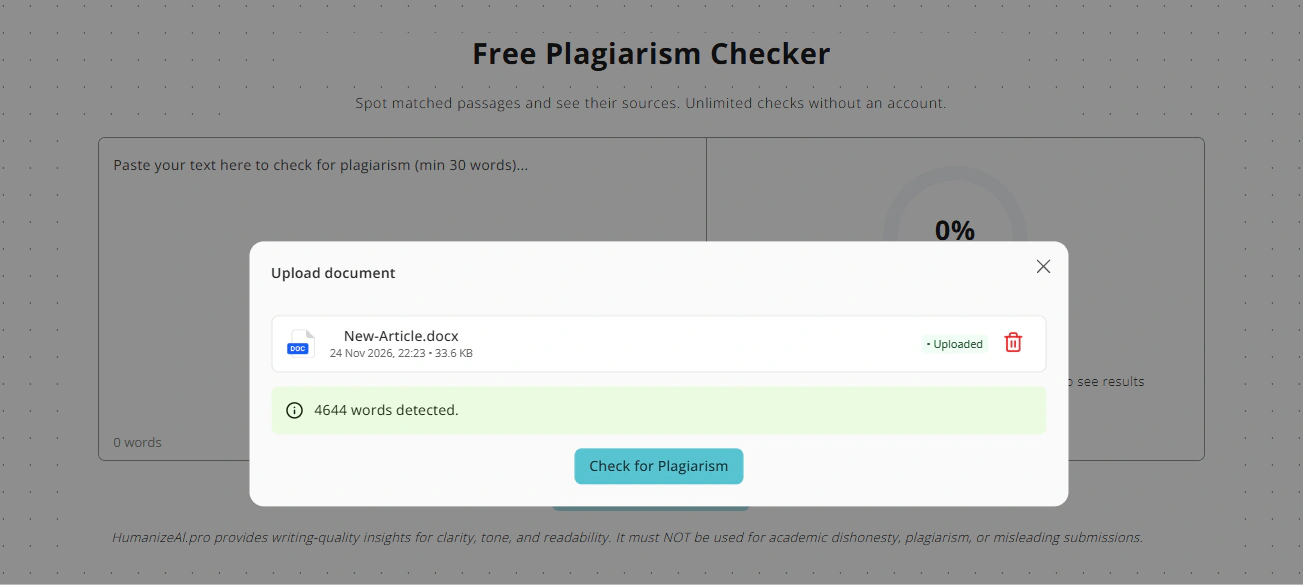
Use Paste here, type into the box, or choose Upload file: the online plagiarism checker accepts PDF, DOCX, TXT and MD files up to 10 MB. A plagiarism check needs at least 30 words, and the counter under the box shows your total.
Click Check for Plagiarism
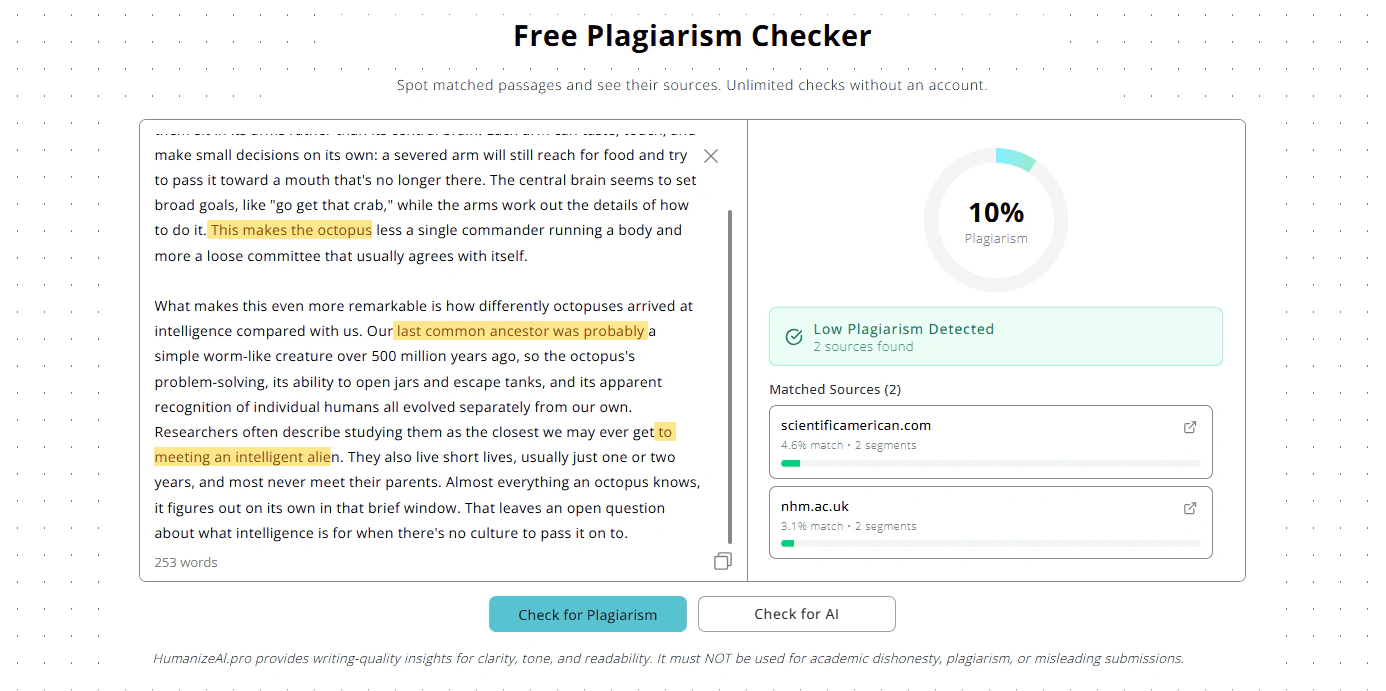
The panel shows a running percentage while the plagiarism check runs, then the result opens next to your text on the same page.
Go through the matches
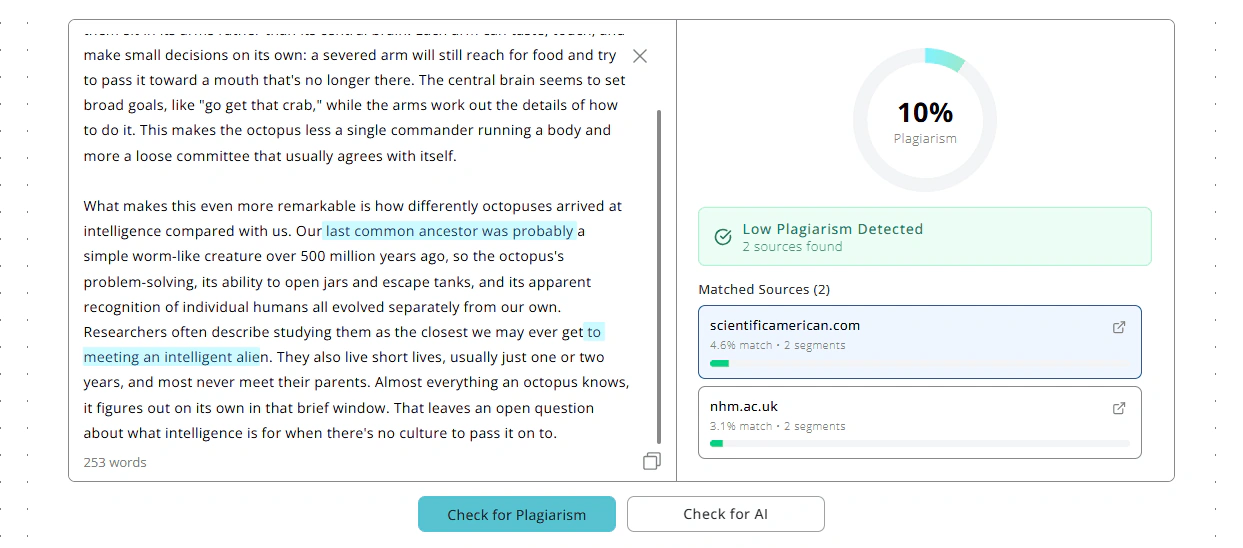
Matched passages turn yellow. Select a source card to switch its passages to blue, or open the source page from the link icon on the card.
Fix the passage and run it again
Edit the passage right in the box. The plagiarism checker clears the old result as soon as you type and brings back Check for Plagiarism, so you can run a new plagiarism check on the edited text.
How to read your plagiarism report
What does the Plagiarism percentage show?
It's a similarity score: the share of your scanned text that the plagiarism checker found on web pages. Short common phrases can match too, so check what each highlight covers before you judge the number.
Why don't the source percentages add up to the total?
Each card shows how much of your text the plagiarism detector matched to that one website, and the same passage often appears on several sites. A segment is one continuous matched stretch, so a source with 3 segments matches your text in three separate places.
How do I read the Check for AI result?
The gauge shows how likely it is that AI wrote the text as a whole, and a cross next to a checker's name means it would likely flag the text as AI. See full report opens AI Detector with your text already loaded, so you can see which passages drove the score.
Who uses the AI plagiarism checker
-
Students: the free plagiarism checker for students marks the sentences in an essay that match published pages, so you can add quotation marks or a reference before the deadline.
-
Researchers: a literature review pulls paraphrased findings from many sources, and the research paper plagiarism checker traces each matched passage to the web pages that carry it.
-
Content writers and freelancers: if a client draft repeats a published page, the plagiarism checker flags it and gives you the exact URL.
-
SEO and content managers: duplicate passages turn up in a plagiarism check of each draft, so you can fix them ahead of publishing.
-
ESL writers: run a summary through the similarity checker to see whether it still follows the source's wording too closely.
-
Teachers: you can use the plagiarism detector free on a submitted essay to get passages and sources to talk through with the student, and the AI detector for teachers covers questions about AI writing.
Beyond the plagiarism checker
-
AI Detector: marks each passage as AI-generated, mixed or human-written and names the closest AI model, for any text, including one that came back with a high match.
-
AI Humanizer: rewrite an AI-assisted draft so it reads in your own voice and keeps the register your assignment or client needs.
Check your draft while there's time to fix it
Run a free plagiarism check on the draft you're about to hand in, then add the references it points to.
Frequently Asked Questions
Is the AI plagiarism checker free?
Yes. You can use this free plagiarism checker online with no sign-up, and the number of checks has no limit. Without a paid plan, each plagiarism check scans the first 500 words. Signed out, you see the top 3 matched sources, and a free account shows all of them. Paid plans scan texts of any length.
Is this an AI and plagiarism checker?
Yes. To check for AI plagiarism as well as copied text, run the plagiarism check first, then click Check for AI once the result reads Low Plagiarism Detected. For a high-match result or a passage-by-passage AI breakdown, open the full AI report.
Is using AI plagiarism?
Not in the copy-and-paste sense: AI text is rarely lifted from one page, so a plagiarism check may find few matches in it. Whether using AI is allowed depends on your school's or client's rules, and many ask you to disclose it. Our ethics statement explains where we draw the line.
Can the plagiarism checker remove plagiarism?
The plagiarism checker finds matches and names their sources, and the fix stays with you, because a citation is what makes borrowed words legitimate. Put copied wording in quotation marks with a reference, or rewrite the idea and still cite it. On a high-match result, Paraphrase it opens a separate rewording tool, but no plagiarism remover replaces the citation.
What percentage of plagiarism is acceptable?
There is no universal number. A properly quoted and cited passage still counts as a match, so the real question is whether each matched passage is credited. Low Plagiarism Detected and High Plagiarism Detected are the plagiarism checker's own labels; your school, journal or client sets the actual rule.
How does the plagiarism checker work?
The plagiarism detector compares the words you scan with public web pages and lists each page that shares passages with your text. Matches come from public web pages such as encyclopedias, study sites and archives, and a repeat plagiarism check of the same text can return a different number of sources. Results can differ from the tool your school uses, which may also search its own archive of submitted papers.
Can I check a whole research paper?
Yes, section by section on the free plan, or in one run on a paid plan. The research paper plagiarism checker takes a PDF or DOCX upload, and a message under your text shows how many words each plagiarism check scanned.